WWDC: A First-Timer’s Thoughts

June 27, 2009
Tags:

WWDC 2009 ended about two weeks ago and I thought I’d take a moment to share some of my thoughts with you.  If you’ve been to WWDC, I doubt you’ll find much here that you haven’t personally experienced.  It’s okay to leave.  You won’t hurt my feelers ;-).  If you’ve never been to WWDC and happen upon this post as we head into WWDC 2010 or beyond, then read on and learn from my first trip.

The Sessions

I’ve been to a number of conferences over the years, but WWDC takes the cake when it comes to presentation style and consistency.  It’s very clear that Apple puts their presenters through some sort of public speaking boot camp.  This helps ensure a high quality performance, but doesn’t necessarily ensure quality content.  I wasn’t a fan of some sessions for the following reasons:

  • Too many of the sessions felt like infomercials.  No need to sell me on your technology Apple, you had me at “Titanium PowerBook G4.”
  • Session level seemed lower than what I expected and I found myself thinking that some “Expert” and “Intermediate” sessions would have been better characterized as “Intermediate” or “Beginner.”
  • I found the same examples being reused across a number of sessions.  For example, I love table views as much as the next person, but it would have been great to see some other examples used when discussing performance analysis.

On the bright side I did find many sessions quite useful.  I’m also a big fan of Apple’s broad to focused session approach.  It really helped give a big picture overview of the conference.  Here’s what I mean.

The keynote discusses a number of new products and technologies, but goes into very little detail.  At the next level we have a number of “state of the union” sessions that get significantly more detailed than the keynote.  These state of the union sessions give you enough information to help you choose topics for the more specific, high detail sessions presented throughout the week.

The Labs

I was told that you shouldn’t miss the labs at WWDC.  That made sense to me.  I mean really, how often do you get to sit with the Apple engineers that wrote the code you’re trying to use?  Unfortunately for me, I had a very poor experience at the first lab I attended and avoided the labs until the last day of the conference.  I won’t get into details, but let’s just say that the engineer I spoke with was less than polite given the simple “newbie” questions my friend Noel and I posed.  It just seemed like the guy really didn’t want to be there, which in turn made me not want to be there.

Luckily, there weren’t many sessions that piqued my interest on the last day of the conference and I decided to give the labs another try.  This time around I had a fantastic experience.  I think I worked with five engineers over  six hours in various labs on the final day of the conference.  The Apple engineers were great.  I learned how to resolve a number of issues and even learned enough about some performance problems to resurrect a project I had put on hold.

Closing Thoughts and Suggestions

Overall I had a very positive WWDC experience and I will probably attend next year.  The highlight for me was meeting and interacting with so many wonderful people.  That alone was worth the cost of admission.  Some of the sessions were very good, but I think I’ll spend considerably more time in the labs next time around.

I’ll leave you with this list of things to keep in mind as your prepare for your first or next WWDC. Please add your suggestions to the comments and I’ll move them up to this list.

  • Attend “state of the union” sessions for a big picture view of the conference.
  • Come prepared with problems and get help from Apple engineers in the labs.
  • If you’re on the fence between a lower and higher level session, just go to the higher level one.  You’re an “expert” when it comes to many sessions if you’ve written some OS X or iPhone applications.
  • The attendees are friendly.  Take a moment to introduce yourself to the people around you (be it a session, at snack time, or on the escalator).
  • Bring business cards, but save some trees and get the small ones.
  • Slow down a bit and don’t burn yourself out in the first few days.
  • Wear an interesting shirt (e.g., from a cool past or current employer). It’s a great conversation starter.
  • Don’t waste your time waiting in line for the keynote.  Give yourself another few hours of sleep or go do something more interesting.  Chances are you’ll still get into the main hall.  If not, who cares?  They have plenty of overflow space.
7

Targeting iPhone 2.x on Snow Leopard with Xcode 3.2

June 12, 2009
Tags: ,

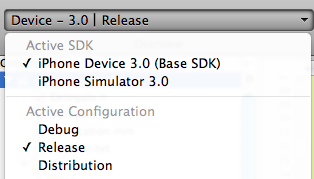
A few of my fellow WWDC 2009 attendees and I drank a little too much of the Apple Kool-Aid and installed Snow Leopard and Xcode 3.2 over our existing Leopard installations.  Unfortunately, iPhone 2.x SDKs were no longer available.

sdk30_drop_down

This is a bit of a bummer if you’d like to continue targeting 2.x devices.  Luckily, the solution turns out to be quite simple.  It also happens to be part of what you’ll need to do to continue targeting 2.x devices while providing advanced features on iPhone OS 3.0 devices.  I’ll leave that discussion for a future post.

To target a 2.x device using Snow Leopard and Xcode 3.2 you have to change your project’s “iPhone OS Deployment Target.”

deploymenttarget

That’s it, you’re done.

Quick note: if you compile and run into issues during device install (e.g., something about not being able to validate), make sure you have no underscores in your app’s name.

2

Judge Scrabby Finally Approved and Released

May 30, 2009

Scrabble fiends rejoice!  It took about three weeks longer than it really should have (details here), but Judge Scrabby, my Scrabble word challenger, is finally in the App Store.

For those of you wondering how I managed to get such an “objectionable” application through the review process, it turned out to be quite simple.  Drum roll please … My super awesome technique boils down to doing absolutely nothing to Judge Scrabby.  That’s right, nada, zilch, zero.  I simply resubmitted the binary that had been previously rejected.  I must have had this app store reviewer the first time through ;-).

Now go play some Scrabble.  You know you want to.

0

Ridiculous App Store Rejection

May 15, 2009

I recently submitted Judge Scrabby, a companion application to Scrabby (an anagram and Scrabble word finder), to Apple’s App Store.  The application is very simple and, in my humble opinion, does one thing extremely well.  Judge Scrabby simply tells you whether or not a challenged set of words are valid according to Scrabble game rules.

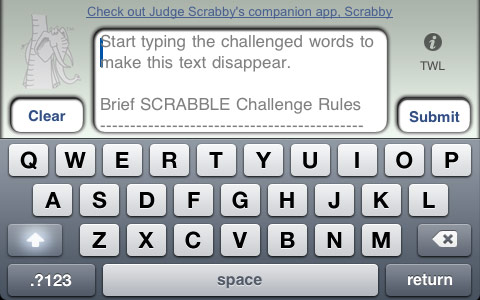
Here’s the main screen where a user can get a quick refresher on how to perform a challenge and where they can enter the words being challenged:

Judge Scrabby main screen.

I figured in about seven days time I’d hear back from Apple with my approval and I’d be off on my merry way.  But alas, life with Apple and the App Store is far from easy sometimes.

About five days after my submission I received a rejection notice from Apple stating that Judge Scrabby “contains objectionable content.” I thought to myself that this had to me a mistake.  What could be so objectionable about a word verifier?  Then I saw it!  Apple was nice enough to include an attachment.  I opened it and saw the two images below (I’ve censored the “u” for your protection and in an attempt to be less “objectionable”).

judgescrabby_censored

judgescrabby_censored_2

So there we have it.  Some potty mouth at Apple entered a few expletives and deemed my app to be objectionable because the words happen to be valid Scrabble words.  The funny thing is you can enter the very same words into, oh I don’t know, Safari.  Give it a whirl and let me know what you get back.  I’ve sent a few emails to the app reviewers pleading my case and I actually got one response.  That was nice.  Too bad their response boiled down to “please see our previous email.”

At this point I’m stuck unless I remove some bad words that a user has to type to actually see.  But why should I have to that?  There are tons of apps in the store that accept these words and do much worse with them.  Some of the apps have functionality similar to Judge Scrabby.  Other popular dictionary applications, GASP, actually define the words.   It all just feels a bit too arbitrary.  Maybe I’m just being too sensitive about this.  After all, I was born in a communist country.

You know I love you Apple.  I can’t even begin to tell you how many people I’ve “converted” over the years (my favorites are the ones that say “there’s no way you can convince me to get a Mac”).  I wouldn’t say anything if I didn’t care.  It’s not about money in this case.  Come on, seriously.  Judge Scrabby might make enough for me to buy a handful of songs and apps on iTunes.  I say this as a shareholder, user, developer, and occasional Trent Reznor quoter:

“Come on Apple, think your policies through and for fuck’s sake get your app approval scenario together.” NIN forums

Read more about rejected iPhone apps:

6

Quick Jump From Finder to Terminal

May 11, 2009
Tags:

fterminal_web_image2Every now and then I find myself in the Finder and really wishing that I was at the Terminal’s command prompt within that Finder directory.  Here’s a short screencast discussing the “open .” command to easily take you from Terminal to Finder and an AppleScript that makes jumping from the Finder’s current directory to the Terminal a breeze.  Enjoy!

Download fTerminal AppleScript.

0

Scrabby Release

March 25, 2009

Scrabby, the Scrabble word finder, is now available on the iTunes App Store. Pick up a copy.  It’s free for a limited time or forever. I haven’t made up my mind yet, so take advantage of my vacillation and get it while it’s free.

2